The Exceptional Onboarding
Product for HR Systems
An internal HR SaaS solution that links the functions of various products according to the user journey, creating a better onboarding experience.
The Challenge
Designing an onboarding process that truly integrates new employees
Designing an onboarding process that effectively integrates new employees into the company culture and provides them with the necessary tools and information.
Selling new features to large enterprise clients with over 10,000 users is challenging because the cost of changing existing workflows is prohibitively high. For small and medium-sized enterprises, it is easy to compare each module with products on the market, which can lead to customer churn or fewer module purchases.
How Did I Have Impact?
Reduce churn rate & increase module purchase rate
Linking module functions to create tailored workflows
Creating smoother workflows to improve work performance
Understanding the Problem
The Report from the CS Team
- Selling new features to large enterprise clients (10,000+ users) is challenging because the cost of changing existing workflows is prohibitively high.
- For small and medium-sized enterprises, easy module-by-module comparison with market products can lead to customer churn or fewer module purchases.
- Admin users frequently ask how to use each module effectively, requiring significant CS team manpower to address needs.

Initial Demand
Develop a new module enabling Admin users to connect functionalities of different modules, creating tailored workflows for departments and teams. This will enhance End Users' workflow experience, boosting purchase rates among large enterprises and reducing churn rates for small and medium-sized enterprises.
How Might We
How do we meet the varied needs of customers for different workflows?
By understanding the current workflows of both existing and potential customers, we can identify the most challenging aspects. This allows us to offer more effective solutions.

Focus Group
Through interviews with the CS team and customers, we learned about their needs and internal workflows, including onboarding, dispute resolution, departures, training, performance management, and talent pool management. New employee onboarding was highlighted as the most frequent and repetitive task.
How Might We
How do we automate high-repetition, labor-intensive, and inefficient workflows for Admin Users?
Based on the interview results, we will assess the value of automating the new employee onboarding process and break down its requirements to plan the MVP version.
Why Deserve to Do This?

For Product
By establishing relationships between modules and utilizing the functionalities of different modules to connect various workflows, we have the opportunity to reduce customer churn rate and increase module purchase rate.

For Team
Create an environment where customers can easily and flexibly use each module to build their own workflows. This can effectively reduce the manpower costs of the Customer Success team.

For Admin User (HR, Manager)
Linking the functionalities of each module to create workflows tailored for each department, team, etc.

For End User (Employee)
Creating smoother workflows for end users to improve their work performance.
Defining the Problem
Onboarding is the key to retaining and engaging talent
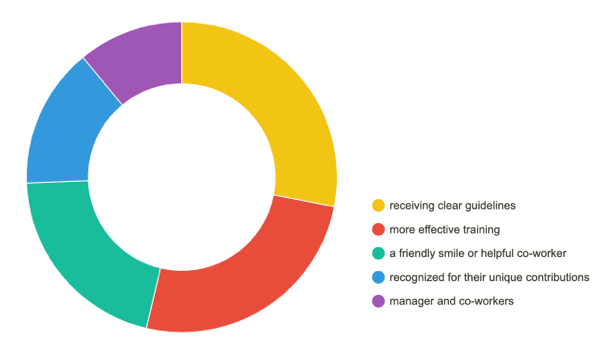
SHRM & BambooHR research on early employee attrition
According to the Society for Human Resource Management (SHRM), it takes a company 6 to 9 months of an employee's salary to find a suitable replacement. Training new employees should be a strategic process lasting at least a year to ensure high retention rates.
BambooHR research found that among employees who left within six months: 23% said clear guidance about their responsibilities would have helped them stay, 21% wanted a more effective training method, and 17% needed a friendly, helpful colleague to feel supported.
The Product Vision
An Exceptional Onboarding Journey with 4 key focus areas
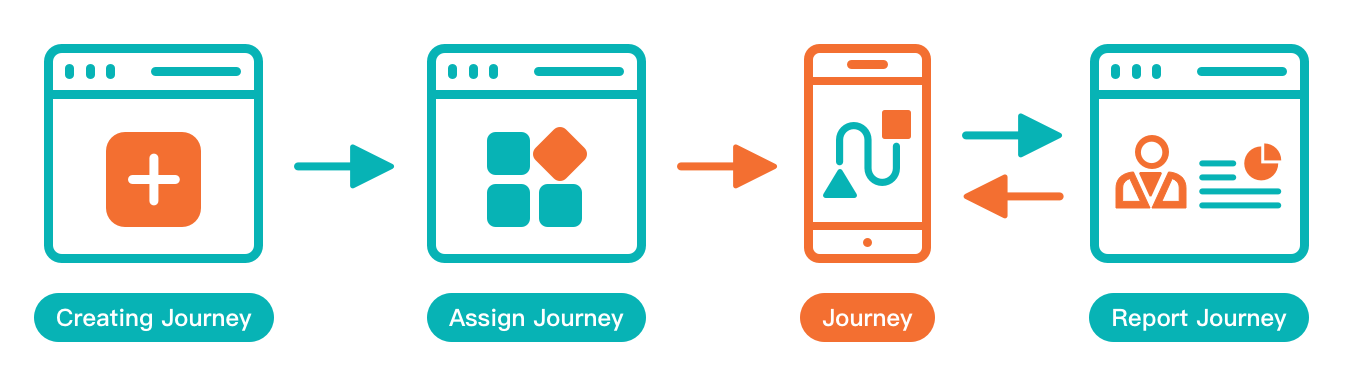
As a product, we wanted to create an exceptional onboarding journey for new employees — connecting modules across the product with four core capabilities.
Admin
Journey Management
Admin Users design different journeys for different people, like a database of travel plans. They use different module features to create unique onboarding plans for each employee.
Admin
Journey Application
Admin Users can assign any journey from the database to different employees and schedule the time needed. End Users get clear instructions on each task they need to complete.
End User
Journey Path
End Users start their journeys here. They receive their specific journey and begin at the scheduled time — a guided, step-by-step onboarding experience.
Admin
Journey Report
The monitoring center. Admin Users receive real-time reports on all journeys — completed, ongoing, and not yet started — and can track each employee's progress and effectiveness.
Defining the MVP
Defining the MVP
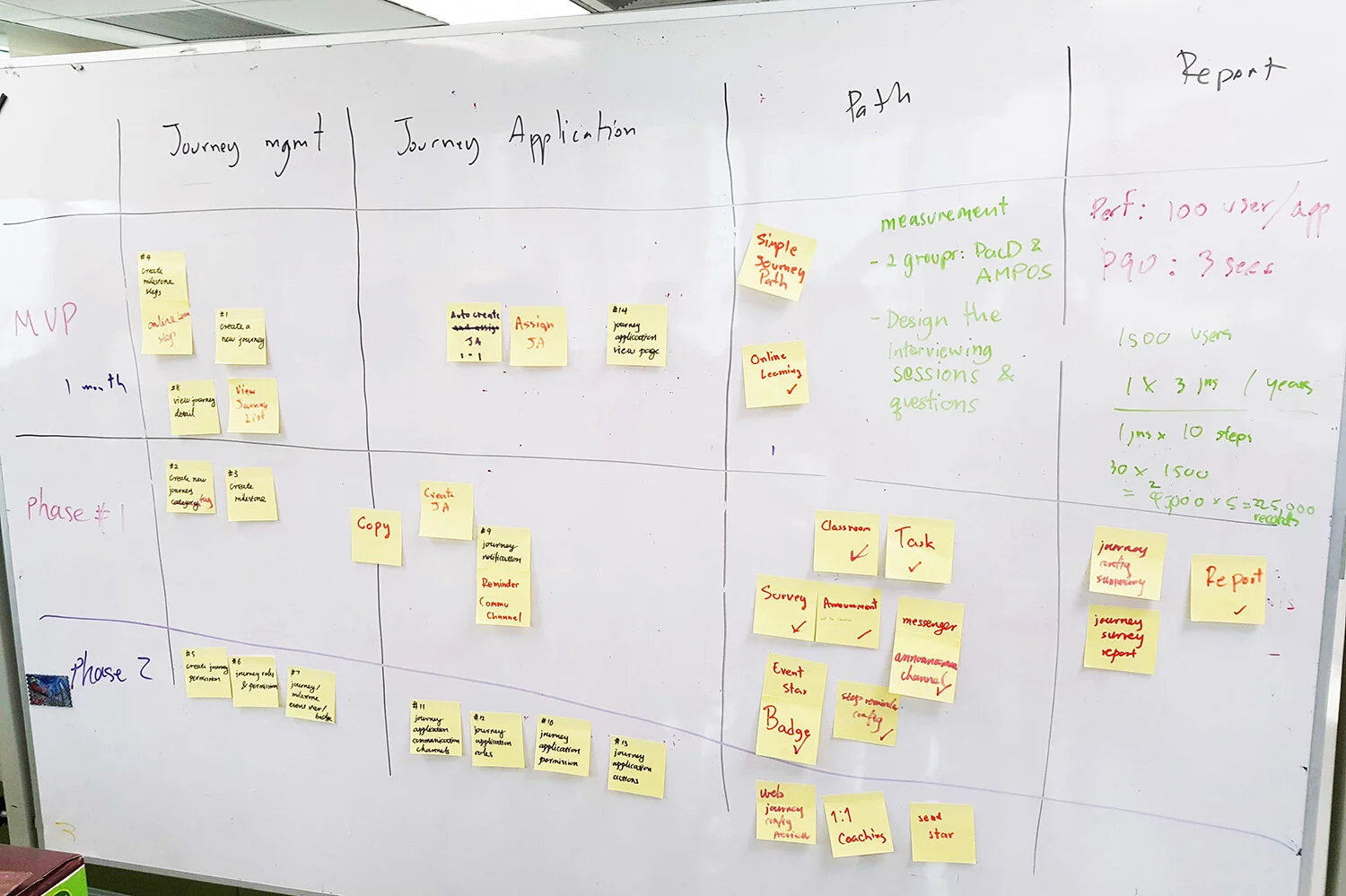
During the 3-day intensive workshop, my team and I wireframed user processes and designed user stories to customize our strategic plan for launching the MVP. Here are the key features we collectively defined for the MVP:
-
Journey Management (Admin)
Journey List / Create New Journey / Create Milestone Step (Online Learning Module) / View Detail
* Considering technical constraints and development time, linking functionalities across multiple modules isn't straightforward. We prioritized the value of connecting modules and will develop them in stages, continually integrating them into the Journey. -
Journey Application (Admin)
Auto Create Journey Application / View Detail
-
Journey Path (End User)
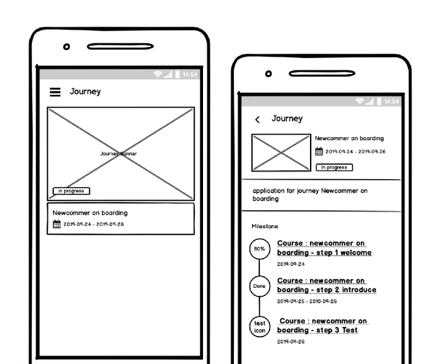
Simple Journey Path
-
Journey Report (Admin)
Due to technical and development time constraints, a comprehensive Report feature is not considered a priority. The Journey Report functionality will not be developed in the MVP version for now.
Designs
Wireframing
For the wireframes based on the defined MVP features, it's crucial to consider not only the functionality of the MVP version but also whether user behavior aligns with the product and the flexibility in design for future possible developments. This will help collect feedback from developers and users effectively.
Validating the Design
User usability testing with key users using a prototype to verify if the design can solve their problems.
Following the Design Guideline
To ensure design style and user experience consistency, it is essential to follow the design style guide established by the AMPOS design team throughout the design process.
Working with Developers
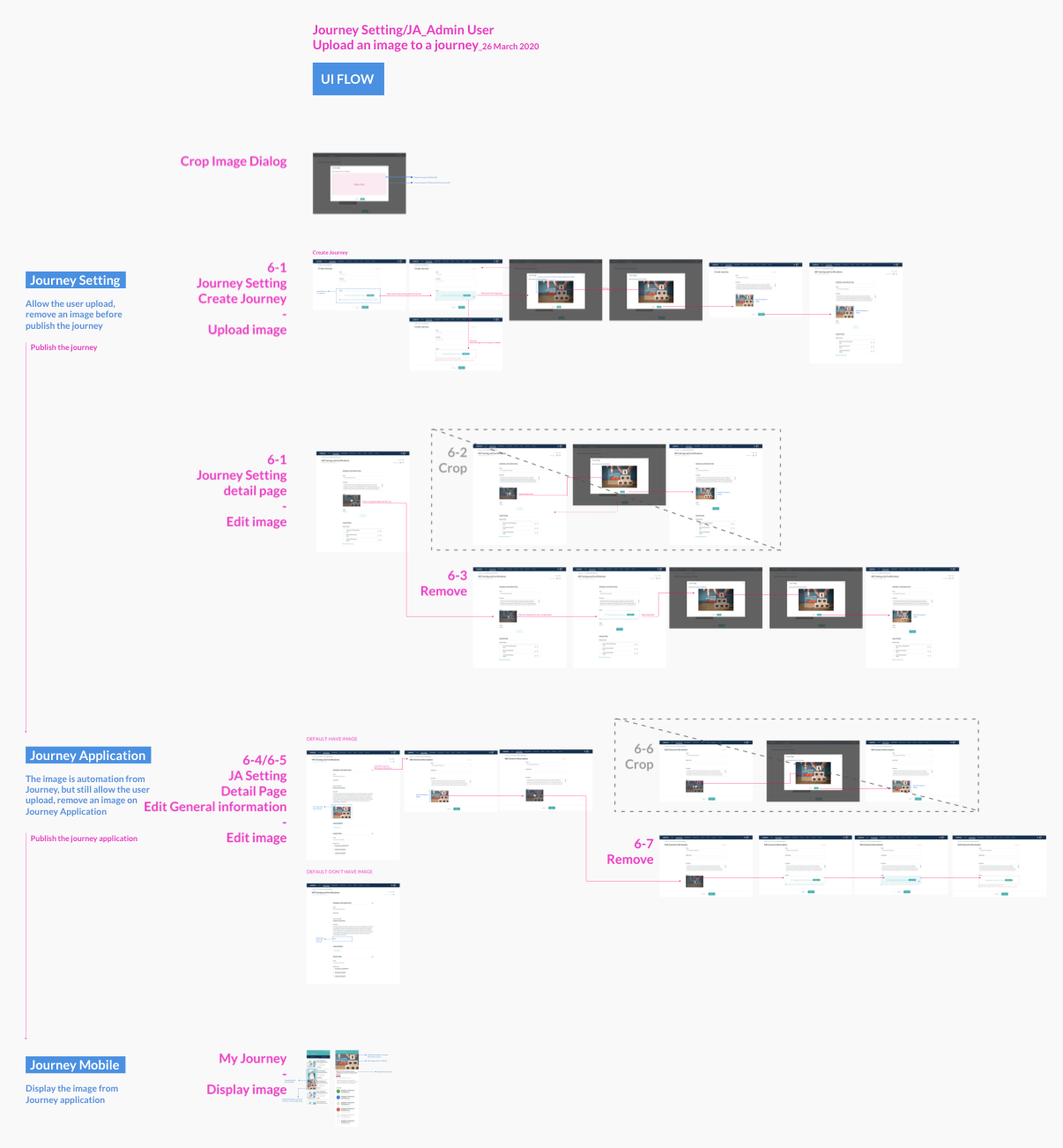
The Scrum Team consists of one Product Owner (PO), five engineers based in Bangkok, and myself. We are collaborating to develop the MVP version within one month. We set different development goals for each Sprint and create corresponding tickets to ensure rapid progress and real-time understanding of each other's progress. The development steps are as follows:
-
01
Confirm UX Validate UX with wireframe and proceed to UI detailed design.
-
02
Write Design Spec Document all design details and specifications to align the team.
-
03
UI/UX Review Conduct a review to ensure consistency with the design before release.
-
04
Update Design Guideline Include any new UI components in the Design Guideline for future reference.
Outcomes
Results and takeaways
Developing a new module is not easier than developing a new product. We need a clear understanding of the module's goals and its impact on the product. In the initial development phase, we prioritize fundamental issues over details to ensure resources are focused on the most valuable aspects.

85% Customer Retention
Successfully retained 85% of customers who were about to churn.
Extremely High User Engagement
Significantly increased employee engagement through a well-designed onboarding experience.

Increased Module Sales
Successfully increased module sales across enterprise clients.